
外观
Chapter 20 showed how to store two numbers — an x coordinate and a y coordinate — in a single object of type posn. This enabled us to write animations that “remember” a two-dimensional position, and can change either or both of the coordinates. Likewise, we saw how to store three numbers — the red, green, and blue components of a color — in an object of type color. But what if you have more than three pieces of information to remember? Or what if one of them isn’t a number? The posn and color data types won’t help you much in those situations. Let’s review what a posn is, then see how to generalize the idea. • A posn is a package containing two “parts” (also known as fields or instance vari- ables) named x and y, each of which is a number. • posn itself is a data type (like number or image), but there may be many instances of this data type. For example, 2/3, 5, and -72541 are all instances of number, while (make-posn 3 4) and (make-posn 92 -3/4) are both instances of posn. • There’s a built-in function named make-posn that takes in two numbers and puts them together into a posn package. (Computer scientists call this a constructor.) • There are two built-in functions named posn-x and posn-y that pull out the in- dividual numbers from such a package. (Computer scientists call these getters or selectors.) • There’s a built-in function named posn? that takes in any Racket object and tells whether or not it is a posn. (Computer scientists call this a discriminator.) Exercise 21.1.1 What are the parts, fields, constructor, selectors, and discriminator of the color data type? If we were trying to represent something other than a two-dimensional coordinate pair or an RGB color, we might need more fields, and they might have different names and types. We would still need a “constructor” function that takes in the values of the parts and puts them together into a package. We would still need several “getter” functions (one for each “part”) that retrieve the individual parts from a package. And we would still need a “discriminator” function which tells us whether a given object is this kind of package at all. Racket provides a way to define other data types analogous to posn, with fields, constructor, getters, and discriminator. Here’s the syntax rule: Syntax Rule 7 Anything matching the pattern (define-struct struct-name (field-name-1 ... field-name-n )) is a legal expression, as long as struct-name is a previously undefined name. (The field- names may or may not already be defined elsewhere; it doesn’t matter.) The expression has no value, but the side effect of defining a new data type struct-name and several functions with contracts ; make-struct-name : n objects -> struct-name ; struct-name -field-name-1 : struct-name -> object
racket
; ...; struct-name -field-name-n : struct-name -> object ; struct-name ?
racket
:
object -> boolean
There’s a lot going on in there, so let’s see how it applies to the two structs we’ve already seen — posn and color. The posn type happens to be predefined in the HtDP languages of DrRacket, but if it weren’t, we could define it ourselves as follows:
racket
(define-struct posn (x y))The struct-name is posn. There are two fields, named x and y. So we’ve defined a new data type named posn, as well as the following functions:
racket
; make-posn :
object(x) object(y) -> posn
; posn-x :
posn -> object
; posn-y :
posn -> object
; posn?
:
object -> boolean
which (mostly) agrees with what we learned in the previous chapter. Exercise 21.1.2 How would you define the color type if it weren’t predefined? There’s one difference between these contracts and those you learned in Chapter 20: the “parts” of a posn here are just “objects”, rather than specifically numbers. In fact, you can build a posn whose “x coordinate” is a string and whose “y coordinate” is an image, and you won’t get any error messages — but as soon as you try to use that posn in a function that expects the coordinates to be numbers, it’ll crash. To avoid this, we agree to follow the convention that the coordinates in a posn are always numbers, so in practice the contracts really are
racket
; make-posn :
number(x) number(y) -> posn
; posn-x :
posn -> number
; posn-y :
posn -> number
; posn?
:
object -> boolean
exactly as we learned in the previous chapter. Worked Exercise 21.1.3 Define a structure to represent a person, with first and last names and age. Solution: The structure has three parts, which can naturally be called first, last, and age. We’ll agree to the convention that first and last are both strings, while age is a number. So the struct definition looks like
racket
(define-struct person (first last age))This has the effect of defining a new data type person, along with the functions
racket
; make-person :
string(first) string(last) number(age) -> person
; person-first :
person -> string
; person-last :
person -> string
; person-age :
person -> number
; person?
:
object -> boolean
To see that this definition actually works, we put the define-struct line (and, ideally, the comments about function contracts) in the definitions pane, hit “Run”, and we can now use the person type as follows:
racket
> (make-person "Joe" "Schmoe" 19)
(make-person "Joe" "Schmoe" 19)
> (define author (make-person "Stephen" "Bloch" 46))
> (define lambda-guy (make-person "Alonzo" "Church" 107))
> (person-first author)
"Stephen"
> (person-last author)
"Bloch"
> (person-last lambda-guy)
"Church"
> (person-first lambda-guy)
"Alonzo"
> (person-first (make-person "Joe" "Schmoe" 19))
"Joe"
> (person-age lambda-guy)
107
> (person?
author)
true
> (person?
"Bloch")
false
> (person?
(make-person "Joe" "Schmoe" 19))
true
SIDEBAR: Alonzo Church (1903-1995) invented a model of computation called the “lambda calculus” (no relation to the “calculus” that’s about derivatives and integrals) which later became the inspiration for the Lisp, Scheme, and Racket languages. This is why there’s a Greek letter lambda (λ) in the DrRacket logo; we’ll learn more about lambda in Chapter 28. He was also my advisor’s advisor’s advisor; so there. Note that you don’t need to define the make-person, person-first, person-last, person-age, or person? functions; they “come for free” with define-struct. We wrote down their contracts only so we would know how to use them.
21.2 A Recipe for Defining a Struct
Back in Chapter 5, we learned a step-by-step recipe for defining a function, and in Chap- ter 10 we learned a step-by-step recipe for writing an animation. A step-by-step recipe for defining a struct is in Figure 21.1. Figure 21.1: Design recipe for defining a struct 1. Identify the parts of the desired data types: how many parts should it have, and what are their names and their types? 2. Write a define-struct according to Syntax Rule 7. 3. Write down (in comments) the contracts for the functions that “come for free”: • a constructor, whose name is make- followed by the name of the struct; • several getters or selectors (one for each field) whose names are the name of the struct, a hyphen, and the name of one of the fields; • a discriminator whose name is the name of the struct, followed by a question mark. 4. Write some examples of objects of the new data type. 5. Write input and output templates for functions that work on the new type. Worked Exercise 21.2.1 Define a data type to represent an employee of a business, including the employee’s name (we won’t bother with first and last names), ID number, and salary. Solution: Identify the parts
racket
; An employee has three parts:
name, id, and salary.
; The name is a string, while id and salary are numbers.
Write a define-struct
racket
(define-struct employee (name id salary))Write contracts for the functions that “come for free”
racket
; make-employee:
string(name) number(id) number(salary) -> employee
; employee-name:
employee -> string
; employee-id:
employee -> number
; employee-salary:
employee -> number
; employee?:
object -> boolean
Write examples of the new data type
racket
(make-employee "Joe" 348 42995)
(make-employee "Mary" 214 49500)
(define emp1 (make-employee "Bob" 470 36000))
(define emp2 (make-employee "Chris" 471 41000))
(check-expect (employee-name emp1) "Bob")
(check-expect (employee-id emp2) 471)
(check-expect (employee-salary emp2) 41000)
(check-expect (employee-salary (make-employee "Mary" 214 49500))
49500)
(check-expect (employee?
emp1) true)
(check-expect (employee?
"Mary") false)
Write templates The input template is
racket
#|
(check-expect (function-on-employee emp1) ...)
(check-expect (function-on-employee
(make-employee "Joe" 348 42995))
...)
(define (function-on-employee emp)
; emp
an employee
; (employee-name emp)
a string
; (employee-id emp)
a number
; (employee-salary emp) a number
...)
|#
and the output template
racket
#|
(check-expect (function-returning-employee ...)
emp1)
(check-expect (function-returning-employee ...)
(make-employee "Joe" 348 42995))
(define (function-returning-employee ...)
(make-employee ... ... ...)
; name, id, salary
)
|#
Common beginner mistakes Students often get confused between define-struct and make-person (and other con- structors like make-employee). By way of analogy, imagine an inventor who has invented a new kind of cell phone. The inventor probably doesn’t actually build cell phones herself; instead, she produces blueprints, diagrams, etc. for how the new kind of cell phone is supposed to go together. Based on these blueprints and diagrams, somebody builds a factory which then builds millions of individual cell phones. In our setting, define-struct is like the inventor. The make-person, make-employee, etc. functions are like factories: they don’t even exist until the inventor has done her work, but then they can be used to build as many instances of person or employee respectively as you wish. I often see students write things like
racket
(define-struct employee (name id salary))
(define emp1 (make-employee "Bob" 470 36000))
(check-expect emp1-salary 36000)
(check-expect (emp1-salary employee) 36000)
There is no variable or function named emp1-salary, nor is there a variable named employee, so the last two lines both produce error messages. But there is a function named employee-salary, which takes in an employee object; the student probably meant
racket
(check-expect (employee-salary emp1) 36000)Another pitfall: the same student writes
racket
(check-expect (employee-salary "Bob") 36000)What’s wrong with this? Well, there is a function named employee-salary, but its contract specifies that it takes in an employee, not a string. What this student is trying to do is look up a previously-defined employee by one of its field values; we’ll learn how to do this in Section 22.6.
21.3 Exercises on Defining Structs
Exercise 21.3.1 Define a structure named my-posn to represent an (x, y) coordinate pair. The result should behave just like the built-in posn, except for its name. Exercise 21.3.2 Define a data type to represent a CD in your audio library, including such information as the title, performer, what year it was recorded, and how many tracks it has. Exercise 21.3.3 Define a data type to represent a candidate in an election. There should be two fields: the candidate’s name and how many votes (s)he got. Exercise 21.3.4 Define a data type to represent a course at your school, including the name of the course, the name of the instructor, what room it meets in, and what time it meets. (For now, assume all courses start on the hour, so you only need to know what hour the course starts.) You’ll need to decide whether a “room” is best represented as a number or a Hint: string. Exercise 21.3.5 Define a data type to represent a basketball player, including the player’s name, what team (s)he plays for, and his/her jersey number. Exercise 21.3.6 Define a data type to represent a dog (or a cat if you prefer), with a name, age, weight, and color. Exercise 21.3.7 Define a data type to represent a mathematical rectangle, whose prop- erties are length and width. There’s already a function named rectangle, so if you try to write Hint:
racket
(define-struct rectangle ...)you’ll probably get an error message. Name your struct rect instead. This data type has nothing to do with images. A rect has no color, it is not Hint: outlined or solid, it has no position, etc.; it has only a length and a width. Exercise 21.3.8 Define a data type to represent a time of day, in hours, minutes, and seconds. (Assume a 24-hour clock, so 3:52:14 PM would have hours=15, minutes=52, seconds=14.)
21.4 Writing functions on user-defined structs
Writing functions using a struct you’ve defined yourself is no more difficult than writing functions using posns. Worked Exercise 21.4.1 Define a function that takes in an employee (from Exer- cise 21.2.1) and tells whether or not the employee earns over $100,000 per year. Solution: Before you type any of this stuff, make sure you’ve got the definition of the employee data type, and perhaps its examples, in the definitions pane. The following stuffshould all appear after that definition. Contract:
racket
; earns-over-100k?
:
employee -> boolean
Examples:
racket
(check-expect
(earns-over-100k?
(make-employee "Phil" 27 119999)) true)
(check-expect
(earns-over-100k?
(make-employee "Anne" 51 100000))
false ; (borderline case)
(check-expect (earns-over-100k?
emp1) false)
; assuming the definition of emp1 from before
Skeleton and inventory:
racket
(define (earns-over-100k?
emp)
; emp
employee
; (employee-name emp)
string
; (employee-id emp)
number
; (employee-salary emp) number
; 100000
fixed number
...)
Body: We don’t actually need the employee name or id, only the salary.
racket
(define (earns-over-100k?
emp)
; emp
employee
; (employee-name emp)
string
; (employee-id emp)
number
; (employee-salary emp) number
; 100000
fixed number
(> (employee-salary emp) 100000)
)
Testing: Hit “Run” and see whether the actual answers match what you said they “should be”. Exercise 21.4.2 Choose a function you’ve already written that operates on posn, and rewrite it to operate on a my-posn instead. Exercise 21.4.3 Develop a function rec-before-1980? that takes in a CD and returns true or false depending on whether it was recorded before 1980. Exercise 21.4.4 Develop a function older? that takes in two person structs and tells whether the first is older than the second. Exercise 21.4.5 Develop a function person=? that takes in two person structs and tells whether they have the exact same name and age. You may not use the built-in equal? function to solve this problem. Exercise 21.4.6 Develop a function same-team? that takes in two basketball-player structs and tells whether they play for the same team. Exercise 21.4.7 Develop a function full-name that takes in a person struct and returns a single string containing the person’s first and last names, separated by a space. Exercise 21.4.8 Develop a function rect-area that takes in a rect struct and returns the area of the rectangle (i.e. length times width). Exercise 21.4.9 Develop a function larger-rect? that takes in two rect structs and tells whether the first has a larger area than the second. Copying the input template for the rect structure will take care of one of the Hint: two parameters; for the other, you’ll need to copy the inventory again and change the parameter name. Exercise 21.4.10 Develop a function seconds-since-midnight that takes in a time- of-day struct and returns how many seconds it has been since midnight. Exercise 21.4.11 Develop a function seconds-between that takes in two time-of-day structs and returns the difference between them, in seconds. For example, the time 11:01:14 is 124 seconds after the time 10:59:10. Hint: Exercise 21.4.12 Develop a function named who-won that takes in three candidate struc- tures (from Exercise 21.3.3) and returns the name of the one with the most votes, or the word “tie” if two or more of them tied for first place. Obviously, this resembles Exercise 15.5.4, but it doesn’t assume that the can- Hint: didates’ names are always “Anne”, “Bob”, and “Charlie”; it’ll work with any names.
21.5 Functions returning user-defined structs
Just as you can write a function to return a posn or a color, you can also write a function that returns a name, cd, employee, or any other type you’ve defined. As in Section 20.5, you’ll usually (but not always!) need a make-whatever in the body of your function. Use the output template. Worked Exercise 21.5.1 Define a function change-salary that takes in an employee (from Exercise 21.2.1) and a number, and produces a new employee just like the old one but with the salary changed to the specified number. Solution: Contract:
racket
; change-salary :
employee number -> employee
Examples:
racket
(check-expect
(change-salary (make-employee "Joe" 352 65000) 66000)
(make-employee "Joe" 352 66000))
(check-expect
(change-salary (make-employee "Croesus" 2 197000) 1.49)
(make-employee "Croesus" 2 1.49))
Skeleton and Inventory Since this function both takes in and returns an employee, we can use both the input and output templates to help us write it.
racket
(define (change-salary emp new-salary)
; emp
employee
; (employee-name emp)
string
; (employee-id emp)
number
; (employee-salary emp)
number
; new-salary
number
(make-employee ... ... ...))
Since this function returns something of a complex data type, we’ll use an inventory with values:
racket
(define (change-salary emp new-salary)
employee (make-employee "Joe" 352 65000)
; emp
; (employee-name emp)
string
"Joe"
; (employee-id emp)
number
352
; (employee-salary emp) number
65000
; new-salary
number
66000
; right answer
employee (make-employee "Joe" 352 66000)
(make-employee ... ... ...))
This makes the Body fairly obvious:
racket
(define (change-salary emp new-salary)
; emp
employee (make-employee "Joe" 352 65000)
; (employee-name emp)
string
"Joe"
; (employee-id emp)
number
352
; (employee-salary emp) number
65000
; new-salary
number
66000
; right answer
employee (make-employee "Joe" 352 66000)
(make-employee (employee-name emp)
(employee-id emp)
new-salary)
)
Now test the function and see whether it works correctly on both examples. Exercise 21.5.2 Develop a function change-jersey that takes in a basketball player struct and a number and produces a basketball player with the same name and team as before, but the specified jersey number. Exercise 21.5.3 Develop a function birthday that takes in a person struct and returns a person with the same first and last name, but one year older. Exercise 21.5.4 Develop a function change-name-to-match that takes in two person structs and returns a person just like the first one, but with the last name changed to match the second one. Exercise 21.5.5 Develop a function raise-salary-percent that takes in an employee structure and a number, and produces a copy of the employee with the specified percentage increase in salary. Exercise 21.5.6 Develop a function add-a-vote that takes in a candidate structure and adds one to his/her vote count. Exercise 21.5.7 Develop a function swap-length-width that takes in a rect structure and produces a new rect whose length is the width of the given rect, and vice versa.
21.6 Animations using user-defined structs
Worked Exercise 21.6.1 Write an animation of a picture that moves steadily to the right or left, say 3 pixels per second; if the user presses the right-arrow key, the picture starts moving to the right, and if the user presses the left-arrow key, the picture starts moving to the left. Solution: Handlers Since the picture needs to “move steadily” at a fixed rate per second, we’ll need a tick handler. Since it needs to respond to key presses, we’ll need a key handler. And as usual, we’ll need a check-with handler and a draw handler. Model Since the picture only needs to move left and right, we need only the x coordinate of its location (we’ll probably want to define a named constant for its y coordinate). However, we also need to keep track of which direction it’s moving — left or right — so that a tick handler can move it in the appropriate direction every second. One way to do that is with a string which will always be either "left" or "right". So our model needs to have two fields, which we can call x (a number) and dir (a string). We’ll name such a data structure a moving-x. Combining this English-language description with a define-struct, we get
racket
; A moving-x consists of x (a number) and
;
dir (a string, either "left" or "right")
(define-struct moving-x (x dir))
which gives us the following functions “for free”:
racket
; make-moving-x :
number string -> moving-x
; moving-x-x :
moving-x -> number
; moving-x-dir :
moving-x -> string
; moving-x?
:
object -> boolean
Some examples of the new data type:
racket
(define state1 (make-moving-x 10 "right"))
(define state2 (make-moving-x 29 "left"))
(check-expect (moving-x-x state1) 10)
(check-expect (moving-x-dir state2) "left")
An input template:
racket
#|
(define (function-on-moving-x current)
; current
moving-x
; (moving-x-x current)
number
; (moving-x-dir current) string
...)
|#
And an output template:
racket
#|
(define (function-returning-moving-x whatever)
(make-moving-x ... ...))
|#
Contracts for handlers We’ll need a draw handler, a tick handler, and a key handler, with contracts
racket
; handle-draw :
moving-x -> image
; handle-tick :
moving-x -> moving-x
; handle-key :
moving-x key -> moving-x
Writing the draw handler We already have a contract. To make the examples easy, we can revive the calendar-at-x function from Chapter 8 and say
racket
(check-expect (handle-draw state1) (calendar-at-x 10))
(check-expect (handle-draw state2) (calendar-at-x 29))
The skeleton and inventory are easy from the input template:
racket
(define ( handle-draw current)
; current
moving-x
; (moving-x-x current)
number
; (moving-x-dir current)
string
...)
If you already see what to do, great. If not, we’ll add an “inventory with values”:
racket
(define (handle-draw current)
; current
moving-x (make-moving-x 10 "right")
; (moving-x-x current)
number
10
; (moving-x-dir current) string
"right"
; right answer
image
(calendar-at-x 10)
...)
This makes the body easy:
racket
(define (handle-draw current)
; current
moving-x (make-moving-x 10 "right")
; (moving-x-x current)
number
10
; (moving-x-dir current) string
"right"
; right answer
image
(calendar-at-x 10)
(calendar-at-x (moving-x-x current))
)
Test this function on the above test cases before going on. Once it works, and if it’s OK with your instructor, you might want to take out the “scratch work”, leaving only the real code, which is quite short:
racket
(define (handle-draw current)
(calendar-at-x (moving-x-x current))
)
Writing the tick handler We already have a contract. Since the speed of motion is a fixed number, let’s define a constant for it:
racket
(define SPEED 3)And since part of the input data type has two cases ("left" and "right"), we’ll need at least two examples, one for each. To be really bulletproof, we should also have a case that handles illegal moving-x objects:
racket
(check-expect (handle-tick (make-moving-x 10 "right"))
(make-moving-x (+ 10 SPEED) "right"))
(check-expect (handle-tick (make-moving-x 29 "left"))
(make-moving-x (- 29 SPEED) "left"))
(check-error (handle-tick (make-moving-x 53 "fnord"))
"handle-tick:
Direction is neither left nor right!")
For the skeleton and inventory, we copy the template, change the name, and add some special values:
racket
(define ( handle-tick current)
; current
moving-x
; (moving-x-x current)
number
; (moving-x-dir current)
string
; SPEED
fixed number
; "left", "right"
fixed strings
...)
Clearly, we’ll need to do something different depending on whether the current di- rection is "left" or "right", so we’ll need a conditional with those two cases (plus an error-handling case). To figure out what to do in each case, let’s copy the relevant parts of the inventory into each case and do an “inventory with values” for each:
racket
(define (handle-tick current)
; ...
(cond [ (string=?
(moving-x-dir current) "left")
; (moving-x-x current)
number
29
; (moving-x-dir current)
string
"left"
; right answer
moving-x
;
(make-moving-x (- 29 SPEED) "left")
...
]
[ (string=?
(moving-x-dir current) "right")
; (moving-x-x current)
number
10
; (moving-x-dir current)
string
"right"
; right answer
moving-x
;
(make-moving-x (+ 10 SPEED) "right")
...
]
[ else (error ’handle-tick
"Direction is neither left nor right!")]
)
)
Which makes the “answer” part of each cond-clause pretty easy:
racket
(define (handle-tick current)
; ...
(cond [(string=?
(moving-x-dir current) "left")
; (moving-x-x current)
number
29
; (moving-x-dir current)
string
"left"
; right answer
moving-x
;
(make-moving-x (- 29 SPEED) "left")
(make-moving-x (- (moving-x-x current) SPEED) "left")
]
[ (string=?
(moving-x-dir current) "right")
; (moving-x-x current)
number
10
; (moving-x-dir current)
string
"right"
; right answer
moving-x
;
(make-moving-x (+ 10 SPEED) "right")
(make-moving-x (+ (moving-x-x current) SPEED) "right")
]
[else (error ’handle-tick
"Direction is neither left nor right!")]
)
)
Test this function on the above test cases before going on. Again, if you delete the scratch work, the function definition is fairly short:
racket
(define (handle-tick current)
(cond [(string=?
(moving-x-dir current) "left")
(make-moving-x (- (moving-x-x current) SPEED) "left")
]
[ (string=?
(moving-x-dir current) "right")
(make-moving-x (+ (moving-x-x current) SPEED) "right")
]
[else (error ’handle-tick
"Direction is neither left nor right!")]
)
)
Writing the key handler We already have a contract. One of the inputs is a key, which for our purposes can be broken down into "left", "right", and anything else.
racket
(check-expect (handle-key state1 "up") state1)
(check-expect (handle-key state1 "right") state1)
; since state1 is already going right
(check-expect (handle-key state1 "left")
(make-moving-x 10 "left"))
(check-expect (handle-key state2 "right")
(make-moving-x 29 "right"))
For the skeleton and inventory, we have a choice: since the function takes in both a moving-x and a key, we could use the template for either one. In fact, we’ll probably need elements of both:
racket
(define (handle-key current key)
; current
moving-x
; (moving-x-x current)
number
; (moving-x-dir current)
string
; key
string
; "left", "right"
fixed strings
(cond [ (key=?
key "left")
...]
[ (key=?
key "right") ...]
[ else
...]
)
)
The “else” case is easy: return current without modification. For the other two, we can use an “inventory with values”:
racket
(cond [(key=?
key "left")
; (moving-x-x current)
number
10
; (moving-x-dir current) string
"right"
; right answer
moving-x (make-moving-x 10 "left")
...]
[ (key=?
key "right")
; (moving-x-x current)
number
10
; (moving-x-dir current) string
"right"
; right answer
moving-x (make-moving-x 10 "right")
...]
[ else
current ]
)
)
To fill in the first of the “. . . ” gaps, we clearly need (make-moving-x (moving-x-x
racket
current) key).For the second, there are two places we could get a "right" from: (moving-x-dir current) and key. Which one should we use? One way to decide would be to do another “inventory with values”, using an example that was traveling to the left . . . but since we’ve already said (make-moving-x (moving-x-x current) key) in the "left" case, it seems plausible to do the same thing in the "right" case:
racket
(cond [(key=?
key "left")
; (moving-x-x current)
number
10
; (moving-x-dir current) string
"right"
; right answer
moving-x (make-moving-x 10 "left")
(make-moving-x (moving-x-x current) key)]
[ (key=?
key "right")
; (moving-x-x current)
number
10
; (moving-x-dir current) string
"right"
; right answer
moving-x (make-moving-x 10 "right")
(make-moving-x (moving-x-x current) key)]
[ else
current ]
)
)
Notice that we’re returning the exact same expression in the "left" and "right" cases. Recognizing this, we can simplify the program by combining them into one:
racket
(define (handle-key current key)
; ...
(cond [ (or (key=?
key "left") (key=?
key "right"))
(make-moving-x (moving-x-x current) key)]
[ else
current ]
)
)
Test this before going on. Running the animation Now that we know each of the handlers works by itself, we can put them together:
racket
(big-bang
(make-moving-x (/ WIDTH 2) "right") ; start at middle, moving right
(check-with moving-x?)
(on-draw handle-draw)
(on-tick handle-tick 1)
(on-key handle-key)
)
which, when I test it, works as it’s supposed to. Exercise 21.6.2 Modify the animation of Exercise 21.6.1 so that if the x coordinate be- comes less than 0, the direction switches to "right", and if the x coordinate becomes more than WIDTH, the direction switches to "left" — in other words, the picture “bounces” off the walls. Exercise 21.6.3 Modify the animation of Exercise 20.6.4 so that it keeps track of how many clicks you’ve done before successfully clicking on a dot. Once you do, it should replace the contents of the animation window with something like "Congratulations! It took you 13 clicks to hit a dot." Your model needs to “remember” the current x and y coordinates of the dot, Hint: as well as how many clicks there have been so far (initially zero). The tick handler will generate a new set of random coordinates but keep the click count unchanged. The mouse handler will add one to the click count, but leave the coordinates unchanged (unless the click was close enough, in which case it builds an appropriate stop-with message using number->string and string-append). This is easier to do using stop-with than stop-when. Hint:
21.7 Structs containing other structs
In Exercise 21.6.3, you probably defined a struct with three fields: x, y, and clicks. Two of the three happen to be the exact same fields as in a posn, so an alternative way to define this struct would be as two fields, one of which is a posn. (Fields of a struct can be any type, even another struct.) This has some advantages: any function you’ve previously written to work on posns can be re-used without change. It also has some dis- advantages: building an example is more tedious, e.g. (make-click-posn (make-posn 3 4) 5) rather than (make-click-posn 3 4 5). Exercise 21.7.1 Modify the animation of Exercise 21.6.3 to use this sort of a model. It should behave exactly as before. Is the code shorter or longer? Easier or harder to understand? (If you did Exercise 21.6.3 using a nested struct, try it with three fields instead. Is the code shorter or longer? Easier or harder to understand?) Exercise 21.7.2 Define a data type placed-circ to represent a mathematical circle with its two-dimensional location. It should have a posn for its center, and a number for its radius. Exercise 21.7.3 Define a data type placed-rect to represent a mathematical rectangle with its two-dimensional location. It should have a posn for the “top-left corner” (a common way of representing rectangles in computer graphics), and two numbers for the width and height. Exercise 21.7.4 Define a function circs-overlap? that takes in two placed-circ structures and tells whether they overlap. Use the distance between their centers, together with their radii. Hint: Exercise 21.7.5 Write an animation in which a particular (small) pic- ture moves with the mouse over a (large) background picture, and every time the user clicks and releases the mouse button, the small picture is added to the

background picture at that location. For example, if the small picture were a smiley-face, you could place a bunch of smiley-faces in various places around the background picture, with a smiley-face always moving with the mouse so you can see what it’ll look like in advance. Exercise 21.7.6 Write an animation of a dot that moves around the screen at a constant speed until it hits the top, left, right, or bottom edge of the window, at which time it “bounces off”. You’ll need a posn to represent the current location, plus two numbers (or a posn, Hint: if you prefer) to represent the current velocity — how fast is it moving to the right, and how fast is it moving down? When you hit a wall, one component of the velocity should be reversed, and the other should stay as it was. You may find it easier to break your tick handler into three functions: one to move the dot, one to decide whether it should bounce in the x dimension, and one to decide whether it should bounce in the y dimension. Exercise 21.7.7 Modify the animation of Exercise 21.7.6 so that if you press any of the arrow keys, it accelerates the dot in that direction (that is, it changes the velocity, not the location). You now have a rocket-ship simulation. Exercise 21.7.8 Modify the animation of Exercise 21.7.6 so that every second, the dot slows down a little bit (call it friction) — say, 5% per second. You now have a billiards simulation. Exercise 21.7.9 Modify Exercise 18.2.5 (typing into the animation window) so there’s a vertical-bar cursor showing where you’re currently typing. The right-arrow key should move the cursor one character to the right (unless it’s already at the end of the text), left-arrow one character to the left (unless it’s already at the beginning), any ordinary character you type should be inserted into the text where the cursor is (and the cursor should move to the right), and the key ”backspace” should delete the character just before the cursor. You’ll need to define a structure to represent both the string that appears in the Hint: window and the location of the cursor. One good way to do this is to store two strings: the text before the cursor and the text after the cursor. Exercise 21.7.10 Write an animation with a “palette” containing four colored panels (say, red, green, blue, and white) down the left-hand side, and a “picture region”, initially all white, filling the rest of the animation window. When
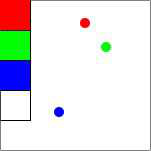
you click on any of the colored panels, a dot of that color starts moving with your mouse, and when you click the mouse anywhere in the picture region, the dot is left there; then you can go on and add more dots of that color, or pick up a different color and add some different-colored dots.
21.8 Decisions on types, revisited
In section 15.8, we learned to define a new data type “by choices”, e.g. “an X is either a Y or a Z”. But in that chapter, Y and Z were always predefined types like string, number, image, etc.. The technique of “definition by choices” becomes more useful when Y and Z are themselves defined “by parts”, i.e. structs. Recall that to write a function on a type defined by choices, we needed discriminator functions (e.g. number?, string?, image?) to tell which type something was. Conve- niently enough, define-struct gives you a discriminator function for the newly-defined type, with the obvious name (posn?, person?, employee?, candidate?, . . . ). Worked Exercise 21.8.1 Define a data type named placed-shape which is either a placed-circ (from Exercise 21.7.2) or a placed-rect (from Exercise 21.7.3). Develop a function perimeter which works on a placed-shape and returns the length of the boundary of the shape. Develop a function move-shape that takes in a placed-shape and two numbers dx and dy, and returns another placed-shape just like the given one but moved by dx in the x dimension and dy in the y dimension. The data definition is simply “A placed-shape is either a placed-circ or a Solution: placed-rect.” However, for this definition to be useful, we need some examples of the data type, and we need templates. Examples are easy: any placed-circ or any placed-rect will do (and to test a function on placed-shape, we should have at least one of each). Depending on exactly how you did Exercises 21.7.2 and 21.7.3, this could look like
racket
(define shape-1 (make-placed-circ (make-posn 3 8) 5))
(define shape-2 (make-placed-rect (make-posn 15 21) 12 8))
The input template looks like
racket
#|
(define (function-on-placed-shape s)
(cond [(placed-circ?
s) (function-on-placed-circ s)]
[(placed-rect?
s) (function-on-placed-rect s)]
))
|#
where function-on-placed-circ and function-on-placed-rect indicate functions written based on the input templates for those data types. If these functions are fairly short and simple, it may be more practical to combine all three into one, following a combined template like
racket
#|
(define (function-on-placed-shape s)
(cond [(placed-circ?
s)
; s
placed-circ
; (placed-circ-center s)
posn
; (placed-circ-radius s)
number
...]
[(placed-rect?
s)
; (placed-rect-top-left s) posn
; (placed-rect-width s)
number
; (placed-rect-height s)
number
...]
))
|#
Again, some of the details may vary depending on how you did Exercises 21.7.2 and 21.7.3. We can also write an output template:
racket
#|
(define (function-returning-placed-shape ...)
(cond [... (function-returning-placed-circ ...)]
[... (function-returning-placed-rect ...)]
))
|#
As with the input template, if the relevant functions returning a placed-circ and a placed- rect are short and simple, it makes more sense to combine them all into one template:
racket
#|
(define (function-returning-placed-shape ...)
(cond [... (make-placed-circ ... ...)]
[... (make-placed-rect ... ... ...)]
))
|#
To define the perimeter function, we have a choice: either we write three sepa- rate functions circ-perimeter, rect-perimeter, and perimeter, each of which is fairly short, or we combine them into one larger function. We’ll do both here, so you can see the advantages and disadvantages of each approach.
racket
; circ-perimeter :
placed-circ -> number
(define empty-circ (make-placed-circ (make-posn 0 0) 0))
(define circ-1 (make-placed-circ (make-posn 10 4) 1))
(check-within (circ-perimeter empty-circ) 0 .01)
(check-within (circ-perimeter circ-1) 6.28 .01)
(check-within (circ-perimeter shape-1) 31.4 .1)
(define (circ-perimeter c)
; c
placed-circ
; (placed-circ-center c) posn
; (placed-circ-radius c) number
(* pi 2 (placed-circ-radius c)))
Note that since the formula for the perimeter of a circle involves π, which can be represented only approximately in a computer, the answer is approximate so we use check-within rather than check-expect.
racket
; rect-perimeter :
placed-rect -> number
(define empty-rect (make-placed-rect (make-posn 0 0) 0 0))
(define horiz-line (make-placed-rect (make-posn -1 0) 2 0))
(define square-2
(make-placed-rect (make-posn 1 1) (sqrt 2) (sqrt 2)))
(check-expect (rect-perimeter empty-rect) 0)
(check-expect (rect-perimeter horiz-line) 4)
(check-within (rect-perimeter square-2) 5.66 .01)
(check-expect (rect-perimeter shape-2) 40)
(define (rect-perimeter r)
; r
placed-rect
; (placed-rect-top-left r) posn
; (placed-rect-width r)
number
; (placed-rect-height r)
number
(* 2 (+ (placed-rect-width r) (placed-rect-height r))))
The function on placed-shapes is now fairly simple:
racket
; perimeter :
placed-shape -> number
(check-within (perimeter empty-circ) 0 .01)
(check-within (perimeter empty-rect) 0 .01)
(check-within (perimeter circ-1) 6.28 .01)
(check-within (perimeter square-2) 5.66 .01)
(check-within (perimeter shape-1) 31.4 .1)
(check-within (perimeter shape-2) 40 .1)
(define (perimeter s)
(cond [(placed-circ?
s) (circ-perimeter s)]
[(placed-rect?
s) (rect-perimeter s)]
))
If we wanted to write the whole thing as one big function, it would look more like this (the contract and examples are unchanged):
racket
(define (perimeter s)
(cond [(placed-circ?
s)
; s
placed-circ
; (placed-circ-center s)
posn
; (placed-circ-radius s)
number
(* pi 2 (placed-circ-radius s))]
[(placed-rect?
s)
; s
placed-rect
; (placed-rect-top-left s) posn
; (placed-rect-width s)
number
; (placed-rect-height s)
number
(* 2 (+ (placed-rect-width s) (placed-rect-height r)))]
))
If you were sure you would only need the perimeter function, not the more specific versions of it for the placed-circ and placed-rect types, and if you were confident of your programming skills, the single-function solution would probably be quicker and easier to write. On the other hand, three little functions are generally easier to test and debug (one at a time!) than one big function, and they can be individually re-used. For example, if in some future problem you wanted the perimeter of something you knew was a placed-circ, not a placed-rect, you could use circ-perimeter rather than the more general, but slightly less efficient, perimeter. In the long run, you should know both approaches. For the move-shape function, we need at least two examples — a rectangle and a circle:
racket
(check-expect
(move-shape (make-placed-circ (make-posn 5 12) 4) 6 -3)
(make-placed-circ (make-posn 11 9) 4))
(check-expect
(move-shape (make-placed-rect (make-posn 19 10) 8 13) -5 6)
(make-placed-rect (make-posn 14 16) 8 13))
The move-shape function both takes in and returns a placed-shape, so we’ll use both input and output templates.
racket
(define (move-shape it dx dy)
; it
placed-shape
; dx
number
; dy
number
(cond [(placed-circ?
it) (function-returning-placed-circ ...)]
[(placed-rect?
it) (function-returning-placed-rect ...)]
))
We could write two other functions move-placed-circ and move-placed-rect, but this time let’s try a single-function solution. The templates give us the following:
racket
(define (move-shape it dx dy)
; it
placed-shape
; dx
number
; dy
number
(cond [(placed-circ?
it)
; (placed-circ-center it)
posn
; (placed-circ-radius it)
number
(make-placed-circ ... ...)
]
[(placed-rect?
it)
; (placed-rect-top-left it) posn
; (placed-rect-width it)
number
; (placed-rect-height it)
number
(make-placed-rect ... ... ...)
]
))
The width and height of the rectangle shouldn’t change, and the radius of the circle shouldn’t change, but we need a new top-left corner for the rectangle, and a new center for the circle. The obvious way to get these is with add-posns (Exercise 20.5.4):
racket
(define (move-shape it dx dy)
; it
placed-shape
; dx
number
; dy
number
(cond [(placed-circ?
it)
; (placed-circ-center it)
posn
; (placed-circ-radius it)
number
(make-placed-circ (add-posns (placed-circ-center it)
(make-posn dx dy))
(placed-circ-radius it)) ]
[(placed-rect?
it)
; (placed-rect-top-left it) posn
; (placed-rect-width it)
number
; (placed-rect-height it)
number
(make-placed-rect (add-posns (placed-rect-top-left it)
(make-posn dx dy))
(placed-rect-width it)
(placed-rect-height it)) ]
))
Exercise 21.8.2 Develop a function area which works on a placed-shape and returns the area of the shape. Exercise 21.8.3 Develop a function contains? that takes in a placed-shape and a posn and tells whether the posn is inside the shape. Consider the shape to include its border, so a point exactly on the border is “contained” in the shape. that takes in two placed- Exercise 21.8.4 Develop a function shapes-overlap? shapes and tells whether they overlap. This problem is a little harder. Since each of the two parameters can be either a Hint: circle or a rectangle, you have four cases to consider. The “both circles” case is handled by Exercise 21.7.4; the “both rectangles” case can be handled by using a previously- defined function on placed-shapes; and the “circle and rectangle” cases will require some geometrical thinking. Exercise 21.8.5 Develop an animation like Exercise 20.6.4 or 21.6.3, but with each shape being either a circle (with random location and radius) or a rectangle (with random location, width, and height), with a 50% probability of each shape. I recommend testing this with a slow clock tick, e.g. 5 seconds, so you have time to try clicking in several places just outside various sides of the shape to make sure they don’t count as hits. Exercise 21.8.6 Define a data type zoo-animal which is either a monkey, a lion, a sloth, or a dolphin. All four kinds have a name and a weight. Lions have a numeric property indicating how much meat they need per day (in kilograms). Monkeys have a string property indicating their favorite food (e.g. “ants”, “bananas”, or “caviar”). Sloths have a Boolean property indicating whether they’re awake. Exercise 21.8.7 Develop a function underweight? that takes in a zoo-animal and returns whether the animal in question is underweight. For this particular kind of monkey, that means under 10 kg; for lions, 150 kg; for sloths, it’s 30 kg; for dolphins, 50 kg. Exercise 21.8.8 Develop a function can-put-in-cage? that takes in a zoo-animal and a number (the weight capacity of the cage) and tells whether the animal in question can be put into that cage. Obviously, if the weight of the animal is greater than the weight capacity of the cage, the answer is false. But sloths cannot be moved when they’re asleep, and dolphins can’t be put in a cage at all. Exercise 21.8.9 Define a data type vehicle which is either a car, a bicycle, or a train. All three types of vehicle have a weight and a top speed; a bicycle has a number of gears; a train has a length; and a car has a horsepower (e.g. 300) and a fuel-economy rating (e.g. 28 miles/gallon). Exercise 21.8.10 Develop a function range? on vehicles. It should take in the num- ber of hours you’re willing to travel, and will return how far you can go in that much time on this vehicle.
21.9 Review of important words and concepts
A struct is a data type made up of several “parts”, also called fields or instance variables. An instance of a data type is an individual object of that type — for example, 2/3, 5, and -72541 are all instances of the type number, while (make-posn 3 4) is an instance of the type posn. The built-in function define-struct allows you to define a new struct type, and also provides several functions to allow you to manipulate the new type: a constructor which builds individual instances of the new data type; several getters or selectors (one for each field) which retrieve the value of that field from an instance of the new type; and a discriminator which tells whether something is of the new type at all. There’s a step-by-step recipe for defining a struct, just as for defining a function or writing an animation: 1. Identify the parts, their names and types 2. Write a define-struct 3. Write the contracts for the constructor, getters, and discriminator 4. Write some examples 5. If you expect to write several functions involving the data type, write input and output templates. A function can not only take in but return instances of user-defined struct types, as with posn. If you need to write such a function, the “inventory with values” technique will be very useful. Many animations need more than just two numbers in their models, so you often need to define a struct type for the purpose. The fields of a struct can be of any type, even another struct. This sometimes allows you to better re-use previously-written functions (especially for posns). Definition by choices becomes much more interesting when the choices can themselves be user-defined types. Functions written to operate on such types may be written in one of two ways: either one function per type, with a short “main” function that simply decides which choice the input is and calls an appropriate helper function, or as one big function with the helper functions “collapsed” into the main function. The single-function approach may be more convenient if the helper functions are all very short and simple, and if they are unlikely to be needed on their own; otherwise, it’s usually safer and more flexible to write one function per type.
21.10 Reference: Built-in functions for defining struc- tures
The only new syntax introduced in this chapter is define-struct.